Blog Post 12
Here are some assistive technologies that can help teachers and students:
Assistive Technology Google Slides
Assistive Learning Videos
Assistive Technology Articles
Sunday, November 9, 2014
Sunday, November 2, 2014
Blog Post 11
What can we learn about teaching and learning from these teachers?
In the video Back to the Future the students watched a hot air balloon take off, the movement, and landing, then Mr. Crosby had the students write a story about them being the hot air balloon. The students posted their stories and pictures on their blogs in a story format. Having these students become the hot air balloon helped them to learn about the air currents and the students had fun creating their stories. Mr. Crosby is teaching his students to write, share, tell stories, articulate orally, getting feedback, and connecting globally to other people.
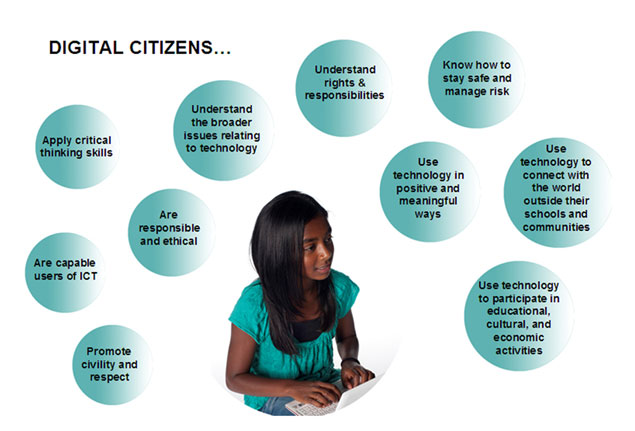
Watching Teaching Digital Citizen by Sam Pain, students learned that using the internet they need to be respectful, responsible, and not to give out personal information. Mr. Pain had the students create a superhero to convey being a good digital citizen. Students created a comic strip using pictures of themselves, their superheros, and a situation of not being a good digital citizen. In these comics the superhero would tell the students what not to do. The students seemed to enjoy doing this project and it helped them learn what to do and not to do on the internet.
By watching Blended Learning Cycle I learned that Mr. Anderson introduces the subject with a driving question, which gains the students interest. Then he has the students investigate the question and elaborate on it. Next the students discuss any questions they have with Mr. Anderson. Finally the students can take a quiz until they understand the subject. By having blended learning the students can research the material on their own, watch classroom videos, and speak to the professor. This gives the students extra learning material instead of just lectures. And watching Roosevelt Elementary's PBL program I learned that project based learning gives the students in-depth learning, integrated thematic instruction, real world problems, and teaches them to research and present their presentations. These teaching methods help the students to learn in-depth information and the students enjoy the accomplishments after completing them. Teachers now have to instruct the students how to use the media and equipment for learning. If the students need help the teachers are their to guide them through any problems they have, which includes acdemic questions. Teachers and students are teaching each other new and exciting information everyday.
In the video Back to the Future the students watched a hot air balloon take off, the movement, and landing, then Mr. Crosby had the students write a story about them being the hot air balloon. The students posted their stories and pictures on their blogs in a story format. Having these students become the hot air balloon helped them to learn about the air currents and the students had fun creating their stories. Mr. Crosby is teaching his students to write, share, tell stories, articulate orally, getting feedback, and connecting globally to other people.
Watching Teaching Digital Citizen by Sam Pain, students learned that using the internet they need to be respectful, responsible, and not to give out personal information. Mr. Pain had the students create a superhero to convey being a good digital citizen. Students created a comic strip using pictures of themselves, their superheros, and a situation of not being a good digital citizen. In these comics the superhero would tell the students what not to do. The students seemed to enjoy doing this project and it helped them learn what to do and not to do on the internet.
By watching Blended Learning Cycle I learned that Mr. Anderson introduces the subject with a driving question, which gains the students interest. Then he has the students investigate the question and elaborate on it. Next the students discuss any questions they have with Mr. Anderson. Finally the students can take a quiz until they understand the subject. By having blended learning the students can research the material on their own, watch classroom videos, and speak to the professor. This gives the students extra learning material instead of just lectures. And watching Roosevelt Elementary's PBL program I learned that project based learning gives the students in-depth learning, integrated thematic instruction, real world problems, and teaches them to research and present their presentations. These teaching methods help the students to learn in-depth information and the students enjoy the accomplishments after completing them. Teachers now have to instruct the students how to use the media and equipment for learning. If the students need help the teachers are their to guide them through any problems they have, which includes acdemic questions. Teachers and students are teaching each other new and exciting information everyday.
Monday, October 27, 2014
Sunday, October 26, 2014
Project 6, C4K October Summary
My first C4K comment for October was Alex in Mrs. Jackin's fifth grade class. Alex's blog was about his grandpa, who he calls Wampy. In his blog he described his favorite memories are when Alex and his Grandfather go out for ice cream. Alex also mentioned that he enjoys his video chat with his grandfather. I think it is really great to have good memories to share with others. For my second C4K I posted a comment on Aly's blog in Ms. Naugle's class. Aly's blog was about helping an younger student on Dot Day. She helped the student with her dot project and played twister. My third comment was to Ariana in the Pt. England School, who wrote about studying maps in class. Ariana's post was about her slide project on reading maps and how much she enjoyed doing the project. In elementary school I remember studying maps and how fun they were, but without google slides.
Blog Post 10
What Can We Learn From Mrs. Cassidy?
In the videos Interview with Kathy Cassidy Part 1, Part 2, and Part 3 I learned that Mrs. Cassidy uses computers, Ipads, Blogger and Twitter to teach her first grade students. Using Twitter Mrs. Cassidy learns new ideas to help improve her teaching methods. By using a class blog the parents and students can see what is happening in the classroom.The students can log into the class blog and find links to websites that are safe to use. Each student writes on their blog at least once a week, depending on how much work they have. After seeing someone post a comment to their post the students get excited. Watching the video Little Kids...Big Potential showed that the students really enjoy using technology in the classroom. They get to make videos, talk to people from all over the world by using Skype, and each students has their own webpage for their class assignments. Watching these videos I think I will have my students create their own webpages to put their assignments on. I will use a class blog so parents can see what the class is working on. As for individual blogs, I think it depends on how many students and teacher aids there are before we can use them. The downside of the internet you have to be careful what sites you log into for security reasons. To help protect the students from predators I will have the students create avatars and only use their first names. I will not put names or any information when posting pictures online, When finding sites for them to use, I will check them out first and guide the students through them. I think the students will enjoy doing these activities because they create their own websites and they learn to work with each other.
Sunday, October 19, 2014
Blog Post 9
What Can Teachers and Students Teach Us About Project Based Learning?
Reading Seven Essentials of Project - Based Learning by John Larmer and John R. Mergendoller showed good examples of how project based learning can help in the classroom. The article mentions that the finished product is not important, but the knowledge the student gains is what matters. It also mentions that students must acknowledge the project as meaningful, and it provides learning for educational purposes. I thought it was very interesting how the author gave a fictional story to help explain project based learning in the classroom. In the article there are seven essentials listed for project based learning. Essential number 1, open up an entry event such as: class discussion, field trip, quest speaker, and videos. Essential number 2, Have the students come up with "A Driving Question" to help solve the issue. The author says the question should be open ended, complex, and linked to what the students are learning. Essential number 3, the students can create public service announcements, web pages, and brochures. Essential number four, Have the students form groups to plan and organize their projects through technology. Essential number five, the students research information and create more questions to solve. Essential number six, students can critique each others' work. At this time they can revise any problems they find with their work and fix then. Finally essential number seven, students present their projects to their peers, family, and community.
In the video Project - Based Learning for Teachers by Tony Vincent, showed us that students learn collaboration, communication, and critical thinking skills. By meeting deadlines, focusing on the process, and revising the project the students can teach themselves and others. This is just a few of what Tony Vincent put in his video. He mentions that students have a voice to create their own decisions.
Reading Seven Essentials of Project - Based Learning by John Larmer and John R. Mergendoller showed good examples of how project based learning can help in the classroom. The article mentions that the finished product is not important, but the knowledge the student gains is what matters. It also mentions that students must acknowledge the project as meaningful, and it provides learning for educational purposes. I thought it was very interesting how the author gave a fictional story to help explain project based learning in the classroom. In the article there are seven essentials listed for project based learning. Essential number 1, open up an entry event such as: class discussion, field trip, quest speaker, and videos. Essential number 2, Have the students come up with "A Driving Question" to help solve the issue. The author says the question should be open ended, complex, and linked to what the students are learning. Essential number 3, the students can create public service announcements, web pages, and brochures. Essential number four, Have the students form groups to plan and organize their projects through technology. Essential number five, the students research information and create more questions to solve. Essential number six, students can critique each others' work. At this time they can revise any problems they find with their work and fix then. Finally essential number seven, students present their projects to their peers, family, and community.
In the video Project - Based Learning for Teachers by Tony Vincent, showed us that students learn collaboration, communication, and critical thinking skills. By meeting deadlines, focusing on the process, and revising the project the students can teach themselves and others. This is just a few of what Tony Vincent put in his video. He mentions that students have a voice to create their own decisions.
Subscribe to:
Posts (Atom)